Manage Working Time Add to Chrome

Manage Working Time

Release notes

What changed in each version, newest first. The extension updates itself from the Chrome Web Store and opens this page when it does.

Open the calendar Current version 3.3.1
3.3.1 Latest

UI

  • Light UI touch-ups.
  • Early leave and Request cards: click one to highlight its days on the calendar below. Click it again, or press Esc, to clear.
3.3.0

Features

  • Log by project booking: in SRA Timesheet, pick a project and press Booked hours. Every day that still has booked hours open for that project is ticked for you, and each one is logged with exactly what is open: the hours booked that day minus what you already logged to it. Partly logged days are topped up, full days are skipped. Press Clear to cancel.
  • Booking per day: every day now lists the projects it is booked for and the hours of each, so you can see what a day should be logged with.
  • Hours worked: every day shows the hours you actually worked according to Zoho (lunch excluded). Hover it to see your check-in and check-out. A forgotten check-out shows "No out".
  • Project booking in the log bar: next to the selection total you can see how many hours the chosen project is booked for this month, how many per day, and how many you already logged. It turns amber when logging the selection would go over the booking.

Bug fixes

  • The log bar no longer covers the last row of days when it grows to an extra line.
3.2.2

Improvements

  • SRA token refresh: after you sign in on sra.smartosc.com, the SRA Timesheet view reloads by itself. The "No SRA token" and "token expired" banners also have a Reload button, so you never need to reload the whole Zoho page.
3.2.1

Bug fixes

  • Important fix to the Present calculation: short days and forgotten check-outs no longer count as a normal Present day.
3.2.0

Features

  • Lunar calendar: the popup header now shows today's lunar date next to your name. On the 1st or 15th of a lunar month, or on a festival such as Lunar New Year or the Mid-Autumn Festival, the chip lights up green and names the day.
  • Click the chip, or Lunar calendar in the menu, to open the new lunar calendar page: a month grid with the lunar date in every cell, the sexagenary cycle for the day / month / year, and the upcoming Vietnamese festivals.

UI

  • Popup header cleaned up: the six icon buttons are now one menu (Open calendar, SRA Timesheet, Lunar calendar, Reload, theme, Settings, Report bug), and your employee ID moved up next to your name.
  • The Checkout Calculator card was removed. The Checkout milestones block already shows the 4H / 6H / 8H times live.
3.1.2

Bug fixes

  • Request Regularization: the Description you type is now submitted with the request. Previously it was silently dropped.

Features

  • New Report bug button in the popup header and the calendar tools menu. Opens the feedback form in a new tab.

UI

  • Dark mode: 4H day cells no longer show a light-pink background; they now use a dark fill matching the other status cells.
3.1.1

Bug fixes

  • SRA mode: the Project dropdown no longer shows "No projects available" when your allocation starts mid-month (or the 1st falls on a weekend). Projects are now resolved from the days you are actually allocated in the month.

Improvements

  • SRA mode: the action bar now shows a live total of what you are about to submit ("20 days × 2h = 40h") as you tick days and edit the Hours field, before pressing Log selected.
3.1.0

Update UI

  • Home, Payslip, SRA mode and Settings are grouped into a single menu next to the logo, freeing up the top bar for the summary cards.
  • The summary cards and the month navigator now line up cleanly with the calendar grid and the Leave Summary column.
3.0.5

Bug fixes

  • Fixed leave request submit failing with "Could not resolve your Zoho user id (ZUID)": the login token cookie is now read correctly on browsers that partition cookies (Brave, and Chrome with third-party cookie partitioning).
3.0.3

Minor updates

  • Minor updates to a few small parts.
3.0.2

UI refresh

  • Refreshed calendar look: white summary cards with a colored status dot, day cells outlined in their status color, the month / year picker moved to the top-right, and larger text throughout for easier reading.
  • Today's cell now stands out with a blue TODAY label and three expected check-out times: 8h / 6h / 4h.

New: log leave

  • Click any day to pick a leave type and submit a leave request right from the calendar, no need to leave the page.

Approval status in day cells

  • Leave days and attendance regularization requests now show their approval status (Pending / Approved / Rejected) right in the day cell, color-coded.
Earlier releases 2.9.6 to 1.5
2.9.6

New look: popup & calendar

  • Redesigned popup: a dark "hero" block showing IN / WORKED / OUT at a glance, a worked-hours progress bar (% of 8h), and the expected checkout times as 4h / 6h / 8h chips.
  • Calendar refreshed to match: the four summary stats are now dark navy cards with a colored status dot, and the Leave Summary is a single clean card with Booked / Absent boxes and per-type Available / Booked.
  • Polished day cells, header buttons, and an orange Donate button, all working in both light and dark mode.
2.9.5

SRA Timesheet mode

  • New SRA mode right inside the calendar, toggle it from the icon next to the brand to log your timesheets to sra.smartosc.com without leaving Zoho.
  • Month view (1st → last day) showing each weekday's logged hours and project, color-coded by state: Logged, Partial, Missing, Holiday, Leave.
  • Tick the days you want, or hit "Select unlogged" to grab every missing / partial weekday at once (weekends, holidays and leave are skipped), then "Log selected" to submit them all with a live progress bar.
  • Pick Project, Hours, Type of Work and an optional note before logging. Project and type-of-work lists are pulled straight from the SRA API.
  • "Projects this month" sidebar summarizes how many projects you're staffed on, with allocated vs. logged hours and utilization per project.
  • SRA token is captured automatically when you open sra.smartosc.com, with a freshness pill in the header. Quick "Open SRA" button added to the popup too.

Store compliance & fixes

  • Removed remotely hosted code (SmtpJS) to comply with Manifest V3 policy.
  • SRA mode is fully locked when no token is present, so no accidental actions.
2.0

Brand new calendar UI

  • Replaces Zoho's default calendar with a modern pay-cycle view: from 21st of last month to 27th of this month, weekdays only.
  • Header summary stats: Workdays · Worked · Early leave · Request, all recomputed automatically with leave-day compensation (1 leave day = 8h).
  • Each cell shows check-in / check-out / total hours / status badge (Present, 6H, Request, Pending, Approved, Holiday, Leave) at a glance.
  • Today's cell gets an 8h / 6h / 4h checkout-time calculator with one-tap precision.
  • Right sidebar shows the year's leave balance: Annual Leave, Bereavement, Seniority, Unpaid, with available vs. booked counts.

One-click regularization

  • Click any past or current day to open the regularization request modal.
  • Type check-in / check-out in HH:MM (24-hour, keyboard-friendly). Total hours is fetched live from Zoho's API after each change.
  • Re-opening a day with an existing request shows an Old vs. New comparison table and the current approval status.
  • Cancel pending requests inline with a custom confirm dialog. Re-submit after cancel or rejection is supported.
  • Pending requests are highlighted right on the calendar cell so you know which days are awaiting approval at a glance.

Themes & quick settings

  • Light and dark mode for the entire extension: calendar, popup, settings, welcome, release notes.
  • Independent color sets per mode: pick your own background and per-status colors (6H, Request, Pending, Approved, Holiday, Leave) for light AND dark.
  • New "Quick settings" gear icon next to the brand for live theme tweaks without leaving the calendar.

Navigation & data

  • Prev / next cycle buttons plus month + year dropdowns to jump to any past cycle. Past cycles use the standard 21 → 20 range.
  • Holiday names (e.g. "New Year Day", "Reunification Day") and leave types (e.g. "Annual Leave", "Seniority leave") are parsed straight from attendance data and shown on the cell.
  • Partial leave days (e.g. 0.25 day Annual Leave) are tagged on the regular Present cell and count toward the day's effective hours.
1.6.1.3

Features

  • Added information about early-return requests (request) used into the popup.
1.6.1.1

Bug fixes

  • Small fixes to the background reminder service.
1.6.1

Bug fixes

  • Fixed the issue of sending too many check-in emails and check-in notifications.
  • Fixed the issue where Na:Na or negative hours were displayed in total hours on the popup.
1.6.0

Features

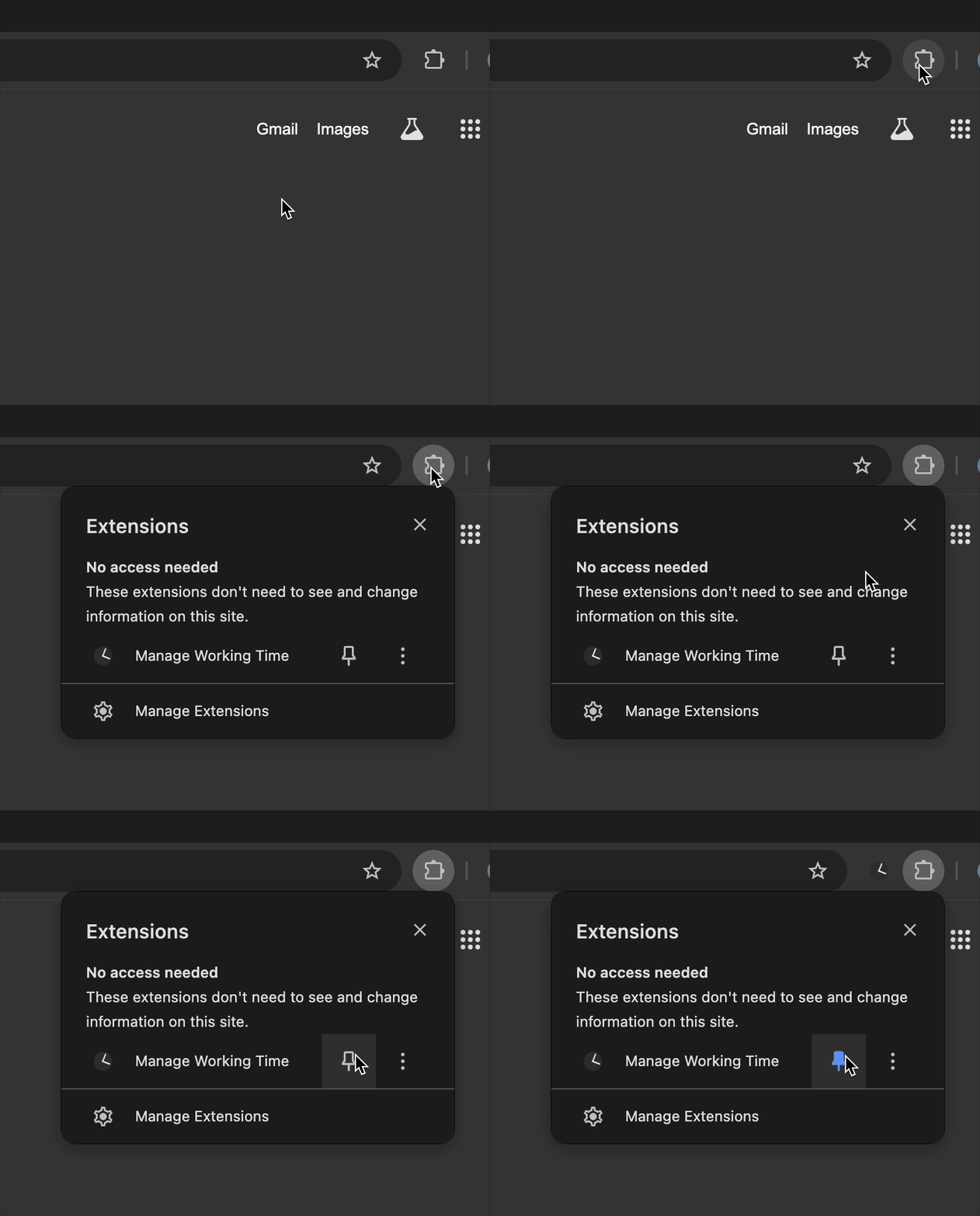
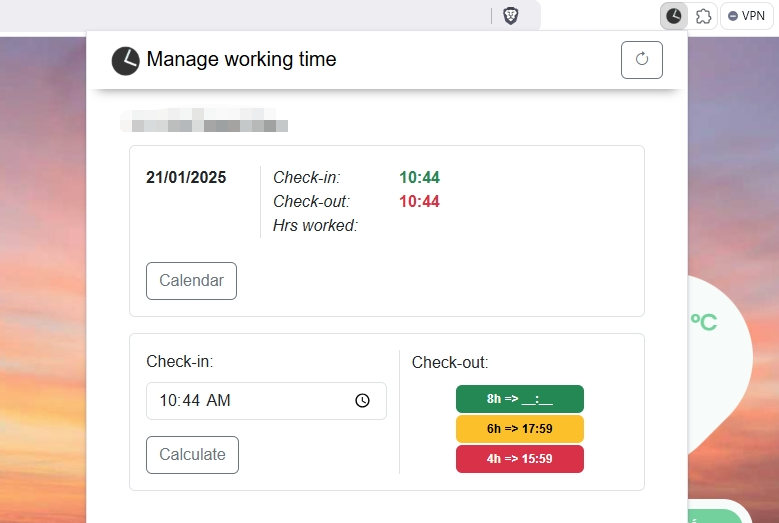
  • View check-in and check-out times directly on the popup. Pin the extension to the toolbar to access.
  • Auto reminders for check-in and check-out times.
  • Auto email with the check-in time and a reminder email 30 minutes before check-out.
Pin the extension Popup UI

Bug fixes

  • Fixed early-leave / requested-days calculation.
  • Fixed leave creation being blocked when the extension was enabled.
1.5.6

Features

  • Check-out time calculation added to the extension's popup.
1.5.5

Bug fixes

  • Misc bug fixes.
1.5.3

Improvements

  • Stability fixes for attendance data loading, plus internal groundwork for the popup.
1.5.2

Improvements

  • Improved expected check-out time calculation.
1.5.1

Bug fixes

  • Hotfix: support for the people.smartosc.com domain.
1.5

First release

  • Attendance summary right on the Zoho calendar: check-in / check-out times, expected check-out, and early-leave / request-day counts.